

Home
Games
Enterprise
Education
About
Contact
Pricing
Docs
Forum

Find answers to common questions and help us improve your Zimension experience
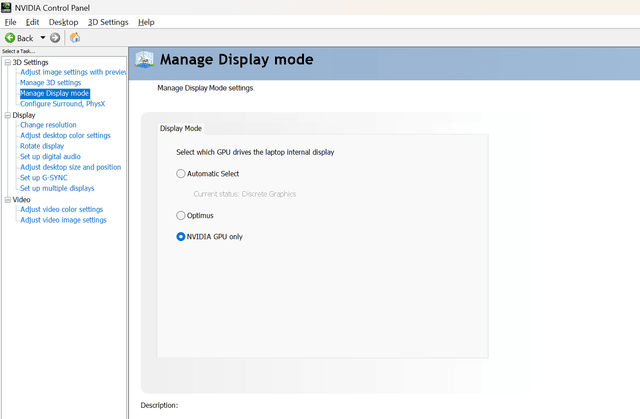
For the best experience on Zimension, ensure your browser is using your dedicated graphics card.
Allow your browser to use the dedicated GPU:
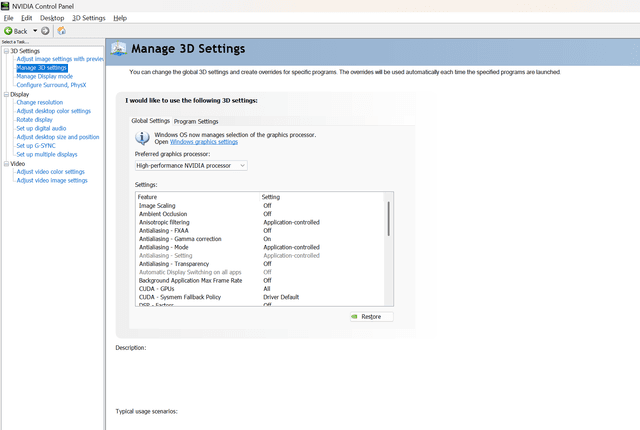
Use your GPU manager to prefer graphics processor:
Find answers to the most common questions about Zimension
Zimension is a web-based, no-code 3D game development platform that allows users to create, customize, and play immersive 3D games across mobile, PC, and VR. You can build games using our intuitive drag-and-drop interface without any programming knowledge.
No! Zimension runs entirely in your web browser. Simply visit zimension3d.com and start creating. We recommend using Chrome, Firefox, or Edge for the best experience.
Zimension offers both free and premium plans. The free plan includes basic features and limited storage, while premium plans offer advanced tools, more storage, and additional features for serious game developers.
Zimension works on desktop computers, laptops, tablets, and smartphones. Games created on Zimension can be played on mobile devices, PCs, and VR headsets. We support WebXR for VR experiences.
Yes! Zimension supports real-time collaboration. You can invite team members to work on projects together, share assets, and build games collaboratively.
Once your game is ready, you can publish it directly on the Zimension platform. Make sure to make the world public in share section of your world/game before Publishing it. You'll get a shareable link that works on any device with a web browser. You can also embed games on your website.
Zimension supports common 3D formats like GLB/GLTF for models, PNG/JPG for textures, MP3/WAV for audio, and MP4 for videos. We also have a built-in asset library with pre-made models and materials.
Performance issues are usually related to GPU settings. Make sure your browser is using your dedicated graphics card (see the performance section above). Also, try closing other applications and browser tabs, and ensure hardware acceleration is enabled.
Currently, games are designed to run on the web platform. However, There are options to export games in exe format and we're working on export options for mobile app stores. Stay tuned for updates!
You can reach out through our feedback form below, join our community Discord server, check our documentation, or contact our support team. We're here to help you succeed!
Yes! We have comprehensive tutorials, and video guides. Check out our discord/whatsapp community and YouTube channel for step-by-step guides on creating different types of games.
Depending on your subscription plan, you may be able to monetize your games. Premium plans typically include commercial usage rights. Check our pricing page for specific details about monetization options. For more details, Reach us out via mail.
Zimension runs in modern web browsers and requires: Chrome 80+, Firefox 75+, Safari 13+, or Edge 80+. For optimal performance, we recommend 8GB RAM, a dedicated graphics card, and a stable internet connection. Mobile devices should have at least 4GB RAM for smooth gameplay.
You can import 3D models in GLB/GLTF format, textures in PNG/JPG, audio files in MP3/WAV, and videos in MP4. Simply drag and drop files into the asset panel or use the upload button. Make sure your models are optimized for web use to maintain good performance.
Yes! Zimension supports multiplayer game creation. You can build games that support multiple players in the same virtual space, with real-time interactions and synchronized gameplay. Check our multiplayer tutorials for detailed setup instructions.
Zimension is designed as a no-code platform, so you don't need to write traditional code. However, for advanced users, we support visual scripting and custom JavaScript for complex game logic and interactions.
To optimize performance: reduce polygon count on 3D models, compress textures, limit the number of simultaneous animations, use LOD (Level of Detail) models, minimize particle effects, and test on different devices. Our performance guide provides detailed optimization tips.
Yes! Zimension supports WebXR for creating VR experiences that work on VR headsets like Oculus Quest, HTC Vive, and others. Your games can be experienced in both traditional browsers and VR environments without additional development.
Free plans include basic features, limited storage (1GB), and Zimension branding. Premium plans offer unlimited storage, advanced features, custom branding, priority support, commercial usage rights, and access to premium assets and templates.
Zimension automatically saves your work in the cloud. You can create manual snapshots of your projects at any time, and premium users get access to version history with the ability to restore previous versions of their games.
Yes, advanced users can integrate external APIs through custom JavaScript. This allows you to connect to databases, payment systems, social media APIs, and other web services to enhance your game functionality.
Upload audio files (MP3, WAV) to your asset library and drag them into your scene. You can set up spatial audio, background music, sound effects triggered by events, and control volume levels. Our audio system supports 3D positional audio for immersive experiences.
Zimension provides built-in analytics including player count, session duration, popular areas in your game, device types, and user engagement metrics. Premium users get access to detailed analytics dashboards and can export data for further analysis.
Use our visual scripting system to add interactivity. You can create clickable objects, moving NPCs, dialogue systems, inventory mechanics, and complex game logic without coding. Our behavior system makes it easy to bring your game world to life.
Absolutely! You can customize UI elements, create custom menus, design HUD elements, and configure control schemes for different devices. The interface builder allows you to create responsive UIs that work across desktop, mobile, and VR.
Your feedback helps us improve Zimension. Share your thoughts, report issues, or suggest new features to make the platform better for everyone.
Help us make Zimension even better
The form will open in a new tab. Thank you for taking the time to help us improve!
Zimension AI
Docs assistant
How can I help?
Ask anything about Zimension docs
AI may make mistakes. Always verify with official docs.