


How to Make a 3D Game Without Coding: Beginner’s Guide
Learn how beginners, students, designers, and non-programmers can create their first 3D game without writing code using Zimension’s browser-based no-code 3D game engine.

How to Make a 3D Game Without Coding: Beginner’s Guide
Creating a 3D game used to feel impossible for beginners.
You had to install heavy software, learn programming, understand 3D pipelines, manage assets, fix technical errors, and spend weeks just to make something playable.
But today, no-code 3D game engines are changing that.
With platforms like Zimension, beginners, students, designers, 3D artists, and creators can build interactive 3D games directly in the browser using visual tools, drag-and-drop assets, ready-made templates, and event-based logic.
In this guide, you will learn how to make your first 3D game without coding.
1. Start With a Simple Game Idea
Your first game should not be too complex.
Instead of trying to build a massive open-world game, start with a small and achievable idea.
Good beginner-friendly ideas include:
| Game Idea | Description |
|---|---|
| Coin Collector | Player collects coins before time runs out |
| Obstacle Runner | Player avoids hurdles and reaches the finish line |
| Escape Room | Player finds keys and unlocks doors |
| Target Shooter | Player shoots targets and scores points |
| Puzzle Platformer | Player solves simple movement-based puzzles |
For your first game, choose one clear goal.
Example:
The player has to collect 10 coins and reach the exit gate.
This gives your game a simple structure: player, environment, coins, goal, and win condition.
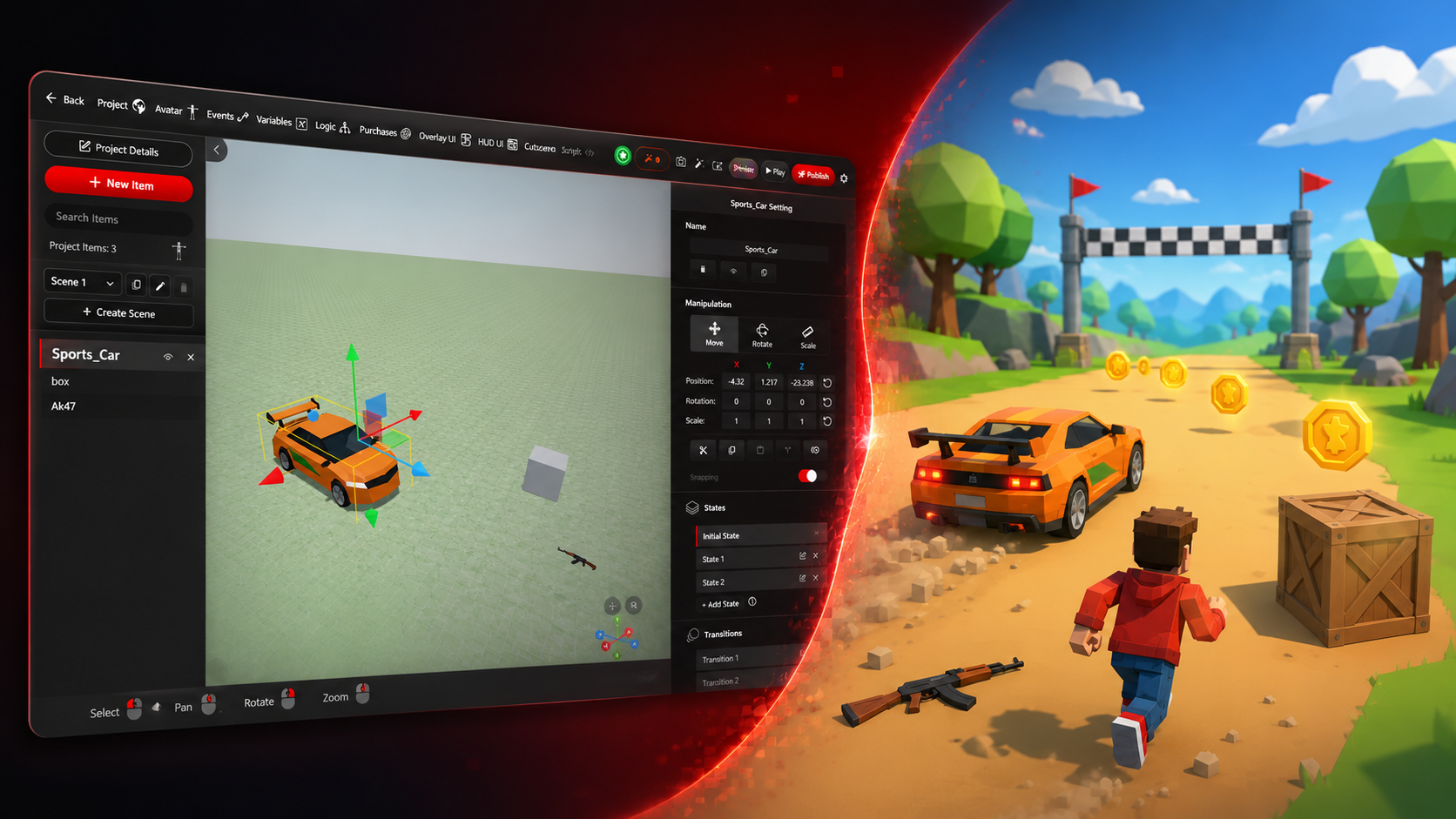
2. Choose a No-Code 3D Game Engine
To make a 3D game without coding, you need a tool that allows you to create gameplay visually.
A good no-code 3D game engine should have:
| Feature | Why It Matters |
|---|---|
| Drag-and-drop editor | Lets you add objects without technical setup |
| Ready-made assets | Helps you build faster |
| Visual event system | Lets you create logic without programming |
| Character controller | Gives you instant player movement |
| Collision events | Helps detect interactions |
| UI tools | Lets you add score, health, buttons, and instructions |
| One-click publishing | Allows you to share your game easily |
Zimension is designed for this workflow.
It runs in the browser, so you do not need to install heavy software. You can create, test, and publish your 3D game from one place.
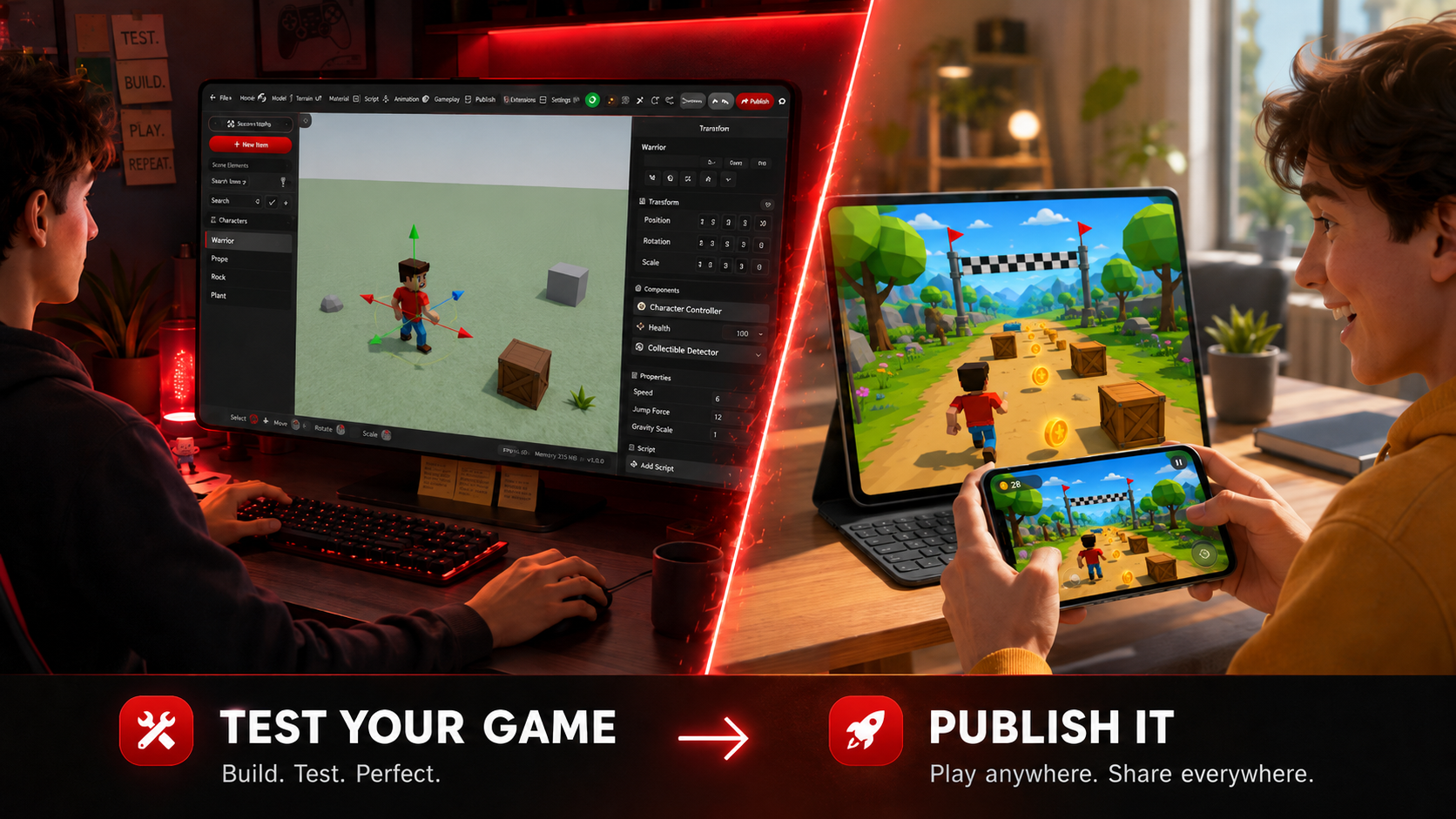
3. Create Your First 3D World
Once you have your idea, start by creating a new project or world.
Your 3D world is the space where your game happens.
For a beginner game, you can start with:
| Element | Example |
|---|---|
| Ground | Grass field, arena, platform, room |
| Player | First-person or third-person character |
| Objects | Coins, boxes, keys, doors, targets |
| Obstacles | Walls, traps, moving blocks |
| Goal area | Exit gate, finish line, portal |
Do not worry about making the game look perfect at the beginning.
First, focus on making it playable.
A playable rough version is more valuable than a beautiful unfinished idea.
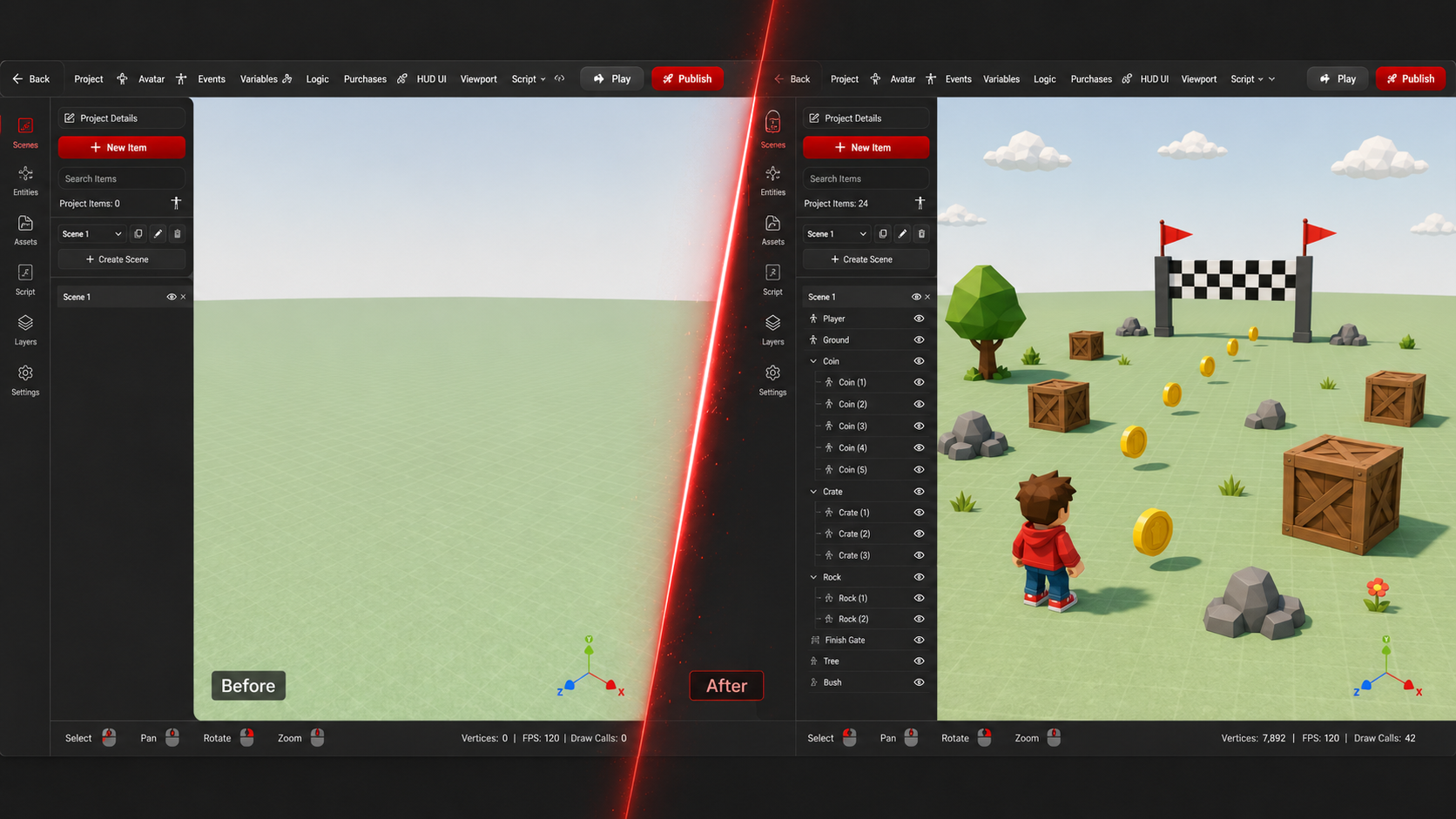
4. Add a Player Character
Every game needs a player.
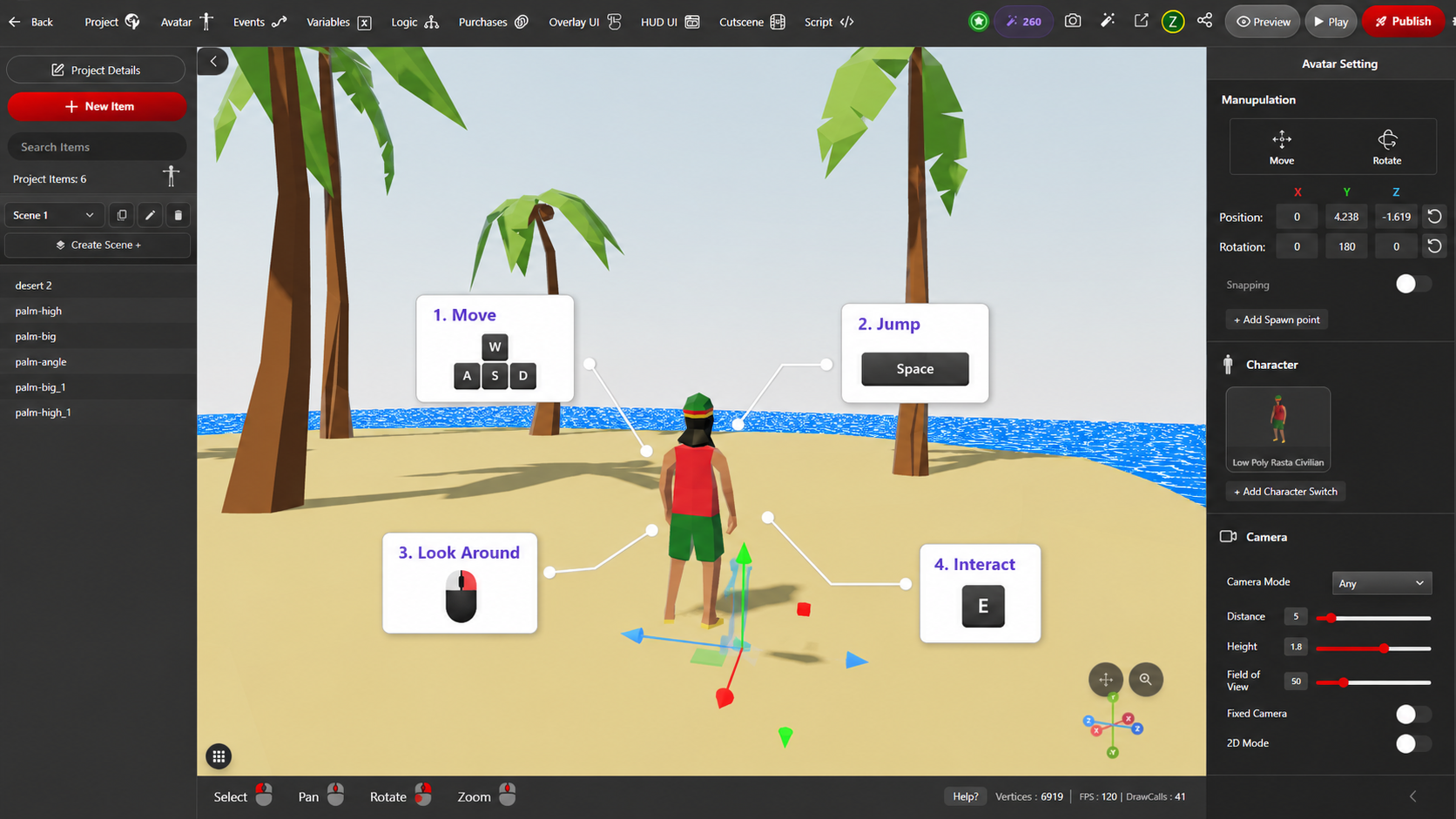
In a no-code engine like Zimension, you can add a playable character without writing movement scripts manually.
Depending on your game type, you can choose:
| Player Type | Best For |
|---|---|
| First-person player | Shooting games, exploration, escape rooms |
| Third-person player | Platformers, adventure games, obstacle games |
| Fixed camera | Puzzle games, arcade games, board-style games |
For a beginner game, third-person or first-person movement is usually enough.
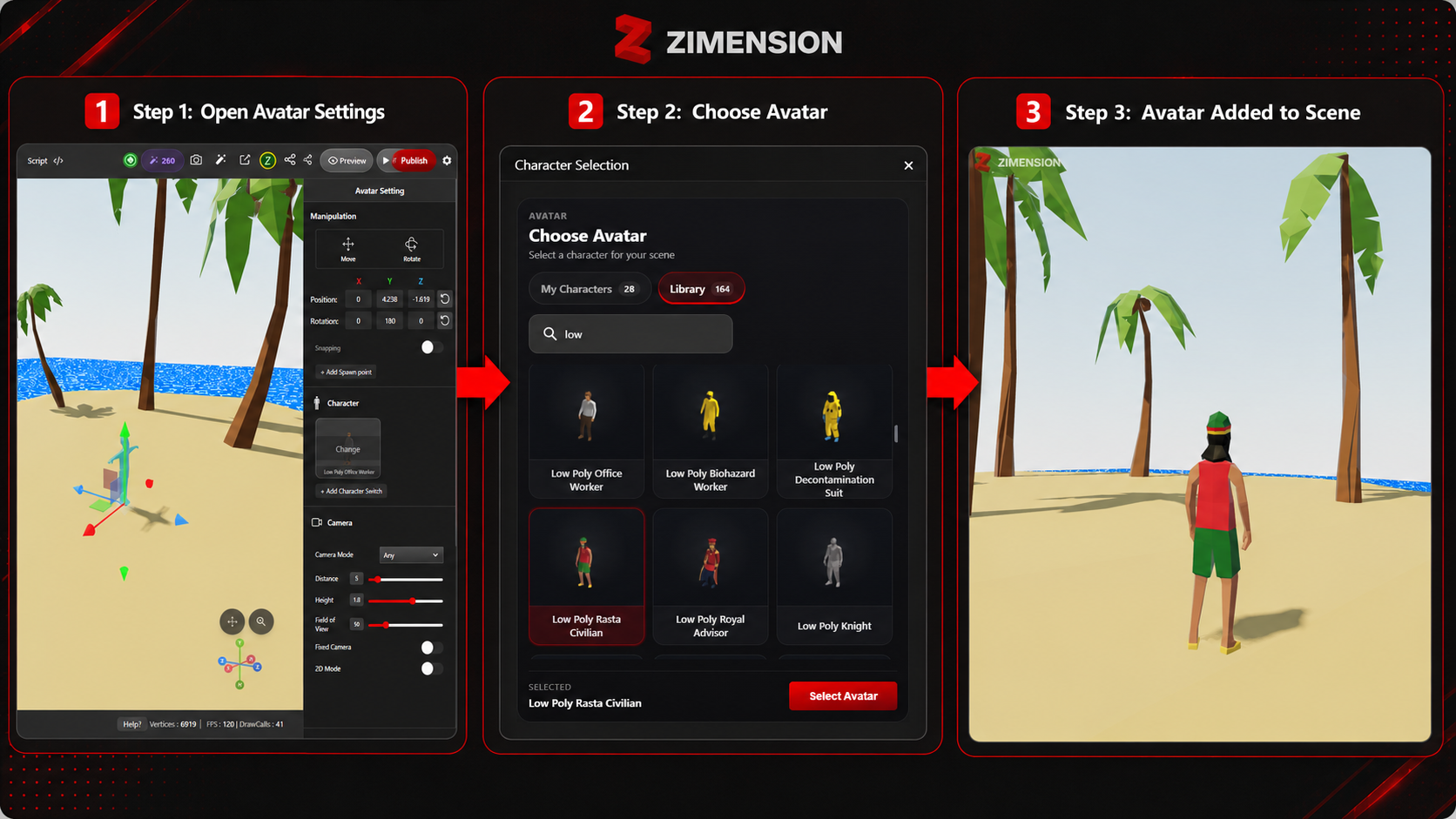
The player is already added, test movement immediately. Walk around the scene and check whether the game feels comfortable by pressing Play button on the top.
5. Add Game Objects and Interactions
Now your game needs something to do.
This is where interactive objects come in.
For example:
| Object | Interaction |
|---|---|
| Coin | Collect when player touches it |
| Key | Unlocks a door |
| Door | Opens after condition is met |
| Target | Gives points when hit |
| Enemy | Reduces health on contact |
| Finish line | Completes the game |
In traditional game development, these interactions require code.
In Zimension, you can create them using events.
Example:
When the player collides with a coin → hide the coin → increase score by 1.
This type of visual logic is much easier for beginners to understand.
Suggested Image:
An infographic showing a simple event flow: Player touches coin → Coin disappears → Score increases.
6. Use Events Instead of Code
Events are the heart of no-code game development.
An event tells the game:
When this happens, do that.
Common game events include:
| Event | Action |
|---|---|
| On start | Show instructions |
| On collision | Collect item or trigger effect |
| On click | Open door or start action |
| On timer end | End game |
| On score reached | Show win screen |
For example, if you are making a coin collection game:
- Create a score variable.
- Add coins in the scene.
- Add a collision event to each coin.
- Increase the score when the player collects a coin.
- Trigger a win message when score reaches 10.
This gives you actual gameplay without writing code.
Suggested Image:
A clean visual scripting or event editor screenshot showing blocks or nodes connected together. Highlight: Coin Collected → Increase Score → Show Win Message.
7. Add UI: Score, Timer, Health, and Instructions
A game becomes much clearer when the player knows what is happening.
You can add UI elements such as:
| UI Element | Purpose |
|---|---|
| Score | Shows progress |
| Timer | Adds urgency |
| Health bar | Shows player status |
| Objective text | Tells player what to do |
| Win/Lose message | Gives feedback |
For example, at the start of the game, show:
Collect 10 coins and reach the exit gate.
During gameplay, show:
Coins: 4 / 10
This makes the game easier to understand and more enjoyable to play.
Suggested Image:
A gameplay screen with visible HUD: score counter, timer, objective text, and a small win popup.
8. Add Sound and Feedback
Sound makes your game feel alive.
Even small sound effects can make a big difference.
You can add sounds for:
| Action | Sound Example |
|---|---|
| Coin collected | Pickup sound |
| Door opened | Unlock sound |
| Player wins | Victory sound |
| Player loses | Failure sound |
| Button clicked | UI click sound |
Feedback is important because it tells the player that their action worked.
For example, when a player collects a coin, the coin should disappear, the score should increase, and a sound should play.
That small feedback loop makes the game feel polished.
Suggested Image:
A 3D coin pickup moment with sound wave icons and score increasing from 4 to 5.
9. Test Your Game
Testing is where your game improves.
Before publishing, check these things:
| Test Point | Question |
|---|---|
| Movement | Can the player move properly? |
| Camera | Is the camera comfortable? |
| Collisions | Do objects react correctly? |
| Score | Is the score updating? |
| Win condition | Can the player complete the game? |
| Difficulty | Is it too easy or too hard? |
| Performance | Does it run smoothly? |
Ask a friend to play your game without explaining too much.
If they understand what to do, your game design is working.
If they get confused, improve the instructions, UI, or level layout.
Suggested Image:
A split-screen image showing a creator testing the game on desktop and another person playing the published version on mobile/browser.
10. Publish and Share Your Game
Once your game is playable, publish it.
One of the biggest advantages of browser-based game creation is easy sharing.
Instead of asking people to download and install files, you can simply share a link.
This is useful for:
| Use Case | Benefit |
|---|---|
| Game jams | Submit quickly |
| Student projects | Share with teachers and classmates |
| Portfolio | Show your work instantly |
| Social media | Let people play directly |
| Client demos | Present interactive prototypes |
With Zimension, your game can be shared as a web experience, making it easier for people to try it.
Suggested Image:
A creator clicking a Publish button and sharing a game link across WhatsApp, Discord, LinkedIn, and browser. Show the same game running on laptop and mobile.
Example Beginner Game: Coin Collector
Here is a simple first game you can build:
Game Name: Coin Rush
Goal: Collect 10 coins and reach the glowing exit gate.
Game Setup
| Element | Setup |
|---|---|
| Player | Third-person character |
| World | Small low-poly island |
| Collectibles | 10 coins |
| Obstacles | Boxes, walls, moving hurdles |
| UI | Coin counter |
| Win condition | Score reaches 10 and player reaches exit |
Game Logic
| Trigger | Action |
|---|---|
| Player touches coin | Hide coin and increase score |
| Score reaches 10 | Activate exit gate |
| Player touches exit gate | Show “You Win” message |
This is a perfect first game because it teaches the basics of game design: movement, collectibles, score, collision, UI, and win condition.
Suggested Image:
A complete mini-game scene: colorful low-poly island, player character, scattered coins, obstacles, glowing exit gate, and score UI.
Why Zimension Is Good for Beginners
Zimension is built to make 3D creation more accessible.
Instead of starting with code, installation, and complex technical setup, creators can start with ideas.
Zimension helps beginners because it offers:
| Zimension Feature | Benefit |
|---|---|
| Browser-based editor | No heavy installation |
| Drag-and-drop workflow | Faster world creation |
| Templates and assets | Quicker starting point |
| Visual event system | Game logic without coding |
| 3D and XR support | Create beyond normal 2D games |
| Easy publishing | Share your game with a link |
| Creator-friendly ecosystem | Build, publish, and grow your portfolio |
This makes it suitable for students, beginners, designers, non-programmers, 3D artists, and anyone who wants to quickly prototype interactive 3D experiences.
Suggested Image:
A feature grid image showing 6 cards: No Code, Browser Based, Drag & Drop, Visual Events, Publish Instantly, and 3D/XR Ready.
Final Thoughts
Making a 3D game no longer requires months of learning before you can create something playable.
With no-code tools like Zimension, you can start with a simple idea, build a 3D world, add a player, create interactions, test your game, and publish it online.
The best way to learn game development is not by watching endless tutorials.
It is by building your first small game.
Start simple. Finish fast. Then improve.
Create your first 3D game without coding on Zimension. Start building today and share your playable game with the world.
Suggested Image:
An inspirational closing image showing multiple creators or students building and sharing 3D games from laptops, with small game thumbnails floating around them.
Build something like this, without code.
Create 3D games, VR experiences and interactive worlds in your browser.
Related posts
 game development
Zimension vs Traditional Game Development Workflows
A quick look at how Zimension compares with traditional game development workflows and helps developers build and iterate faster.