No-code creation
Create scenes and gameplay with visual tools in the browser.


Build your 3D game in Zimension’s browser editor. Turn it into an Android APK, a Meta Quest VR app or a standalone Windows game, with assets packaged for offline play.
Native exports are in preview or experimental release. Availability depends on your plan and project permissions. Check compatibility before sharing a build.
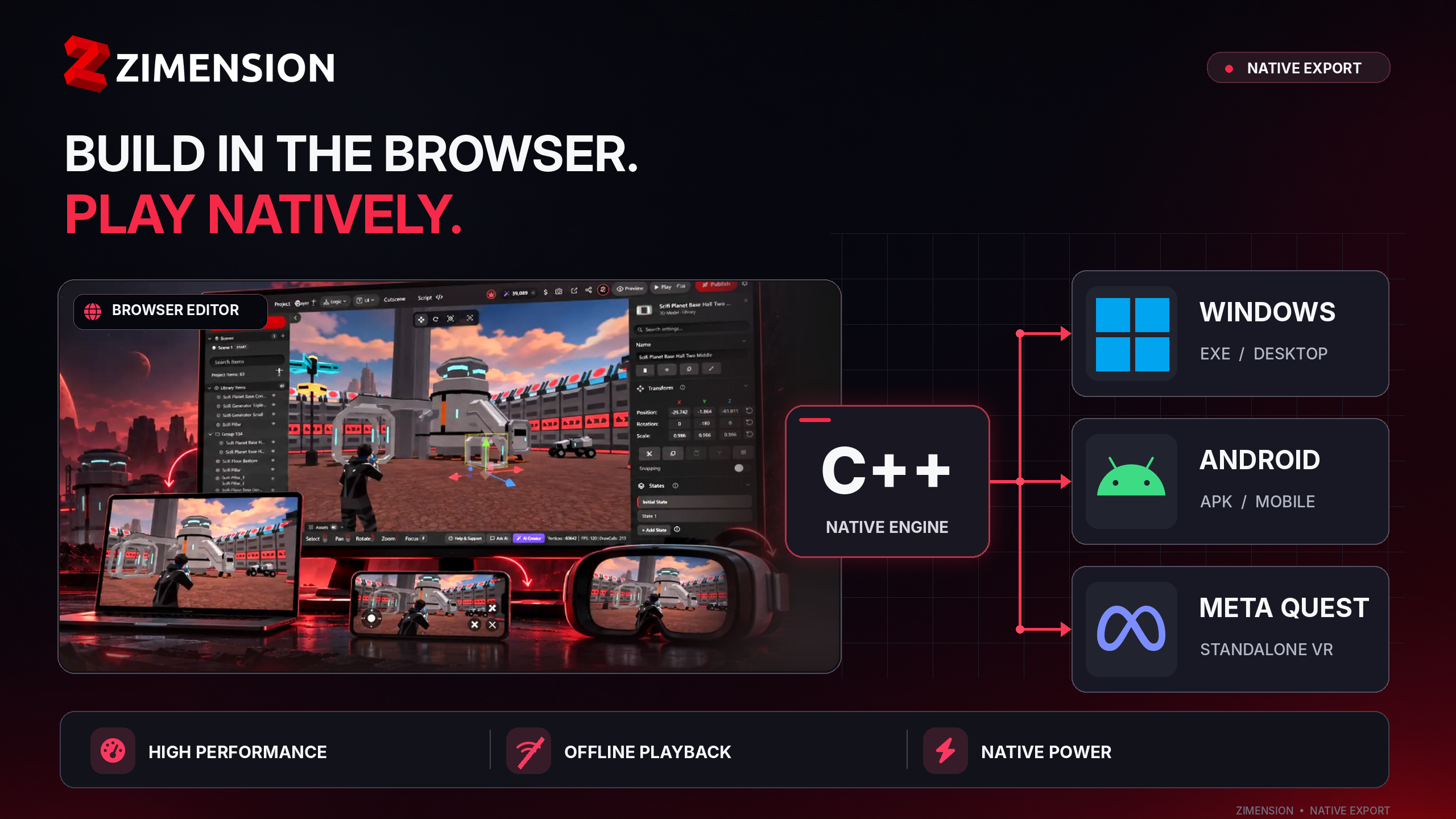
Create your project in Zimension, then export an installable game with its assets.
Create scenes and gameplay with visual tools in the browser.
The native player uses DirectX 12 on Windows and Vulkan on Android.
Exported single-player games include the assets needed to run offline.
Set the game title and icon before exporting.
Available formats and device requirements.
 Native preview
Mobile APK
Export an Android app with touch controls, a game title and an app icon.
Android 11+, 64-bit ARM and Vulkan support.
Download a signed APK. Players allow installation from the file on their device. This export is not a Google Play bundle.
Headset APK
Export a standalone VR app with first-person playback, Touch controller input and in-headset menus.
Meta Quest 2, 3, 3S or Pro. Other OpenXR headsets are not verified.
Install the APK using developer mode and Meta Quest Developer Hub or adb. This export is not a Meta Horizon Store package.
 Experimental
Playable EXE + game files
Export a standalone Windows game with a native renderer and ray-traced lighting, shadows and reflections on supported GPUs.
Windows 10 (2004+) or 11, 64-bit, with a DirectX 12 ray tracing GPU: NVIDIA RTX 20 series, AMD RX 6000, Intel Arc or newer.
Extract the ZIP and keep the executable and packaged game files together. The player is unsigned, so Windows SmartScreen may show a warning.
Try the Windows renderer: Download the experimental native player
The native runtime supports a subset of browser features. These exports are for single-player games; online multiplayer, voice chat and custom JavaScript scripts do not run. Feature coverage and rendering differ between Windows, Android and VR. Review the compatibility notes in the export panel, then check your game on each target device before sharing it.
Native performance is device-dependent. Ray tracing can be demanding, so benchmark your own game on the devices you plan to support.
No Android Studio, Visual Studio or Unity installation is needed for the built-in export workflow.
Create scenes and gameplay in the browser editor. Save your changes.
Open Publish → Export → Export playable project. Select a native Windows, Android or Meta Quest export.
Set the game details and review compatibility notes. Android APKs are built on our servers.
Extract the Windows ZIP or install the APK. Test the game on the target device, including offline playback.
Exported games include project data and assets for single-player playback. They can be used for demonstrations and training without an internet connection.
Create and export online, then test the complete build offline on the target device.
Yes. Build scenes, interactions and gameplay with Zimension’s visual tools in your browser, then choose a native export. Android, Meta Quest VR and Windows exports currently use a preview or experimental runtime, so review the compatibility notes and test your exported game.
Yes. In Zimension, save your project, open Publish > Export > Export playable project, select Android and the native preview, then choose the phone device. Set the app name, package name, version and icon, review the warnings and export. Your project is packed in the browser and built into a signed APK on Zimension’s servers.
You can create your project in Zimension’s browser editor and select the Meta Quest VR device under the native Android export. The APK supports Meta Quest 2, 3, 3S and Pro with Touch controllers. Install it using developer mode; this is a preview APK for sideloading, not a Meta Horizon Store package.
The exported game packages its project data and assets for local, single-player playback without a browser or Zimension sign-in. You need an internet connection to create and export the project. Resolve any missing-asset warnings and test the downloaded build offline before sharing it. Online multiplayer and voice chat are not supported by the native preview.
Native exports run through a dedicated native player and load packaged assets locally. This provides a different performance profile from browser playback, but does not guarantee higher frame rates. Performance depends on the device, scene complexity, resolution and effects. Windows ray tracing is GPU-intensive; test on the hardware your players use.
No. These exports run a subset of browser features for single-player games. Online multiplayer, voice chat and custom JavaScript scripts do not run. Feature coverage, rendering and some gameplay behavior differ by target. Review the compatibility notes for your own project and play through the exported build on each target device.
You do not need to install a development IDE for the built-in native export workflow. Windows packaging happens in your browser; Android APKs are built and signed on Zimension’s servers. Installing a VR APK requires developer mode and a tool such as Meta Quest Developer Hub or adb.
Export access depends on your Zimension plan, project permissions and asset restrictions. Check the pricing page and the export panel for your account. Native preview availability can change as the runtime develops.
Create a project in the browser editor and choose an export format.
Zimension AI
Docs assistant
How can I help?
Ask anything about Zimension docs
AI may make mistakes. Always verify with official docs.