


Character Behaviour
Character Behaviour
Character behaviour lets a character project-item act as a follower, melee enemy, shooter, idle character, or patrol character. Use it for NPC companions, enemies, guards, objective characters, and simple AI-driven movement.
Behaviours are stored on the character item as worldItem.characterBehavior. The container has an enable toggle and a behaviors list, so one character can be configured with multiple behaviours.
Enabling Behaviours
- Select a character project-item in the editor.
- Open the item settings for that character.
- Enable Character Behaviour.
- Add one or more behaviour entries.
- Choose a Behaviour Type:
follow,attack,shoot,idle, orpatrol. - Assign activation events, navigation, weapon, or patrol options as needed.
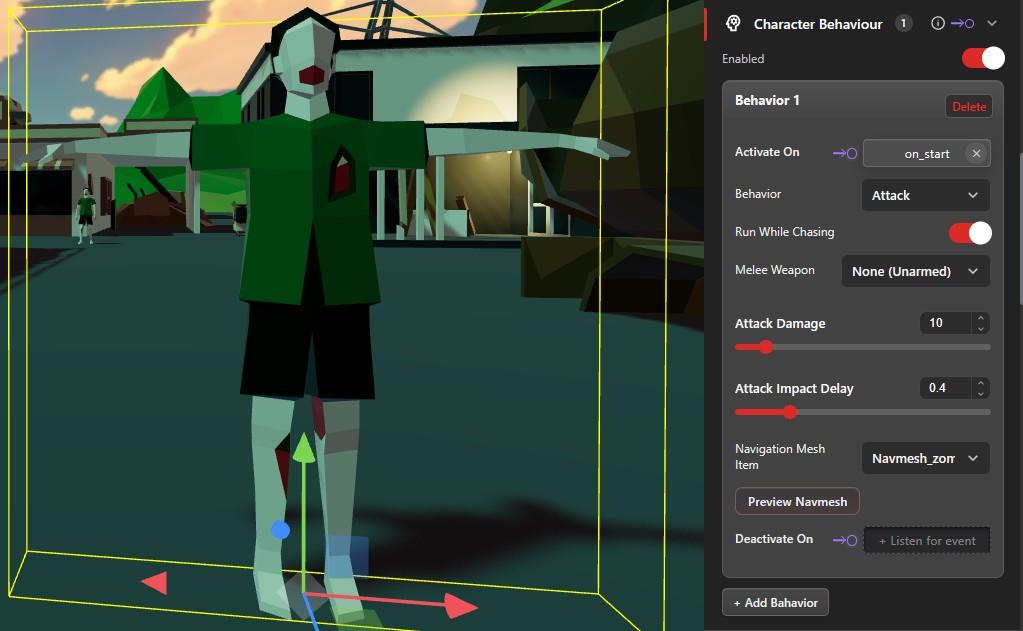
Behaviour Data
Each behaviour can define activation events, a behaviour type, optional navigation, and type-specific settings.
activateEvent- project event name that starts this behaviour.deactivateEvent- project event name reserved for stopping this behaviour.behaviorType-follow,attack,shoot,idle, orpatrol.navmeshItemId- optional navmesh project-item used for pathfinding.
Follow
Follow makes the character walk or run toward the player and stop at a follow distance of 2 units. When a navmesh is assigned, the path is recalculated about every 2 seconds.
- Use for: companions, guides, escort characters, or helper NPCs.
- Options:
activateEvent,deactivateEvent,navmeshItemId, andrunWhileChasing. - Tip: assign a navmesh in complex environments so the character can route around obstacles.
Attack
Attack makes the character chase the player up to 120 units. When the character is within 1 unit, it plays a melee attack animation and applies damage after the configured impact delay.
- Use for: melee enemies, guards, creatures, or close-range hazards.
- Options:
runWhileChasing,attackImpactDelay,activateEvent,deactivateEvent, andnavmeshItemId. - Default:
runWhileChasingis true. Runtime defaultattackImpactDelayis0.26seconds. - Tip: match
attackImpactDelayto the visible hit moment in the melee animation.
Shoot
Shoot makes the character chase the player, stop within 8 units, and fire an equipped weapon. A weapon project-item must be assigned.
- Use for: ranged enemies, sentries, turrets with character models, or boss phases.
- Options:
weaponItemId,difficulty,aimReactionDelay,runWhileChasing,activateEvent,deactivateEvent, andnavmeshItemId. - Default: runtime
aimReactionDelayis0.22seconds andshootCooldownis0.4seconds. - Tip: confirm the assigned weapon item is configured before testing shoot behaviour.
Shoot Difficulty
- Easy -
0.8xdamage,1.35xcooldown,0.75xaccuracy. - Medium - baseline damage, cooldown, and accuracy.
- Hard -
1.3xdamage,0.75xcooldown,1.18xaccuracy.
Idle
Idle makes the character stand still and do nothing. Use this as a resting state, a disabled state, or a behaviour to return to after another action.
- Use for: neutral NPCs, waiting guards, staged enemies, or event-controlled characters.
- Options:
activateEventanddeactivateEvent. - Tip: use idle as the default behaviour before an event activates follow, attack, shoot, or patrol.
Patrol
Patrol moves the character through user-defined patrol points in order. It can loop, run, and pause at each point.
- Use for: guards, roaming enemies, route-based NPCs, and background character movement.
- Options:
patrolPoints,loop,useRun,waitAtPoint,activateEvent,deactivateEvent, andnavmeshItemId. - Defaults:
loopis true,useRunis false, andwaitAtPointis0seconds.
Patrol Setup
- Add a patrol behaviour to the character.
- Add patrol points in the order the character should visit them.
- Name each point clearly, such as
Gate,Hallway, orExit. - Position each point in the project.
- Enable
loopif the patrol should repeat. - Enable
useRunif the character should run between points. - Set
waitAtPointif the character should pause at each point. - Assign a navmesh when the route must go around walls, props, or terrain.
Event-Driven Activation
Each behaviour can be connected to project events using activateEvent and deactivateEvent. This lets other objects, triggers, logic, or scripts control when NPC behaviour starts.
activateEventstarts the selected behaviour.deactivateEventis part of the data model, but runtime deactivation is currently not implemented.- At runtime, activation routes to the matching behaviour call: follow, chase, shoot target, patrol, or idle.
Navmesh and Pathfinding
Follow, attack, shoot, and patrol can use an optional navmeshItemId for pathfinding. If no navmesh is assigned, movement is direct.
- Use a navmesh when characters need to move around walls, props, buildings, or uneven routes.
- Direct movement is simpler and can work in open spaces.
- The editor includes a Generate Default Navmesh button.
Multiple Behaviours
A character can have multiple behaviour objects in its behaviors list. Use separate activation events to switch phases, such as idle first, patrol after the level starts, then attack when the player enters a danger area.
Because automatic deactivation is not yet implemented, avoid overlapping activation events unless you are deliberately replacing the current runtime state. Use clear event names so each behaviour phase is easy to test.
Runtime Defaults
walkSpeed:1.8units/secrunSpeed:4.5units/secfollowDistance:2.0unitschaseDistance:120unitsattackRange:1unitshootRange:8unitsattackImpactDelay:0.26secshootCooldown:0.4secaimReactionDelay:0.22secrotationSpeed:10rad/sec
Runtime States
Character behaviour can move through these runtime states: idle, move, follow, chase, attack, shoot, patrol, and dead.
Animations
The behaviour system expects common character animations and uses them when available.
Idle,Walk,Run,Jump_forward,Dying, andRight_Hookfor melee attack.- Shoot uses the character's weapon firing state.
- If an expected animation is missing, the behaviour can still run, but visual feedback may look static or incomplete.
Damage and Callbacks
onAttackPlayer(pos, damage)applies melee damage throughhitPlayer(damage).onShootPlayer(pos, damage)applies ranged damage throughhitPlayer(damage).onDead()callscharacter.die().
Known Limitations
deactivateEventexists in the behaviour data model, butdeactivateCharacterBehavioris currently a runtime stub.- Behaviour deactivation must be handled manually by activating another behaviour, such as
idle, or by custom logic/script. - Shoot behaviour requires a valid assigned weapon project-item.
- Pathfinding quality depends on the assigned navmesh. Without a navmesh, movement is direct.