
CtrlK
Visual Scripting
Visual Scripting
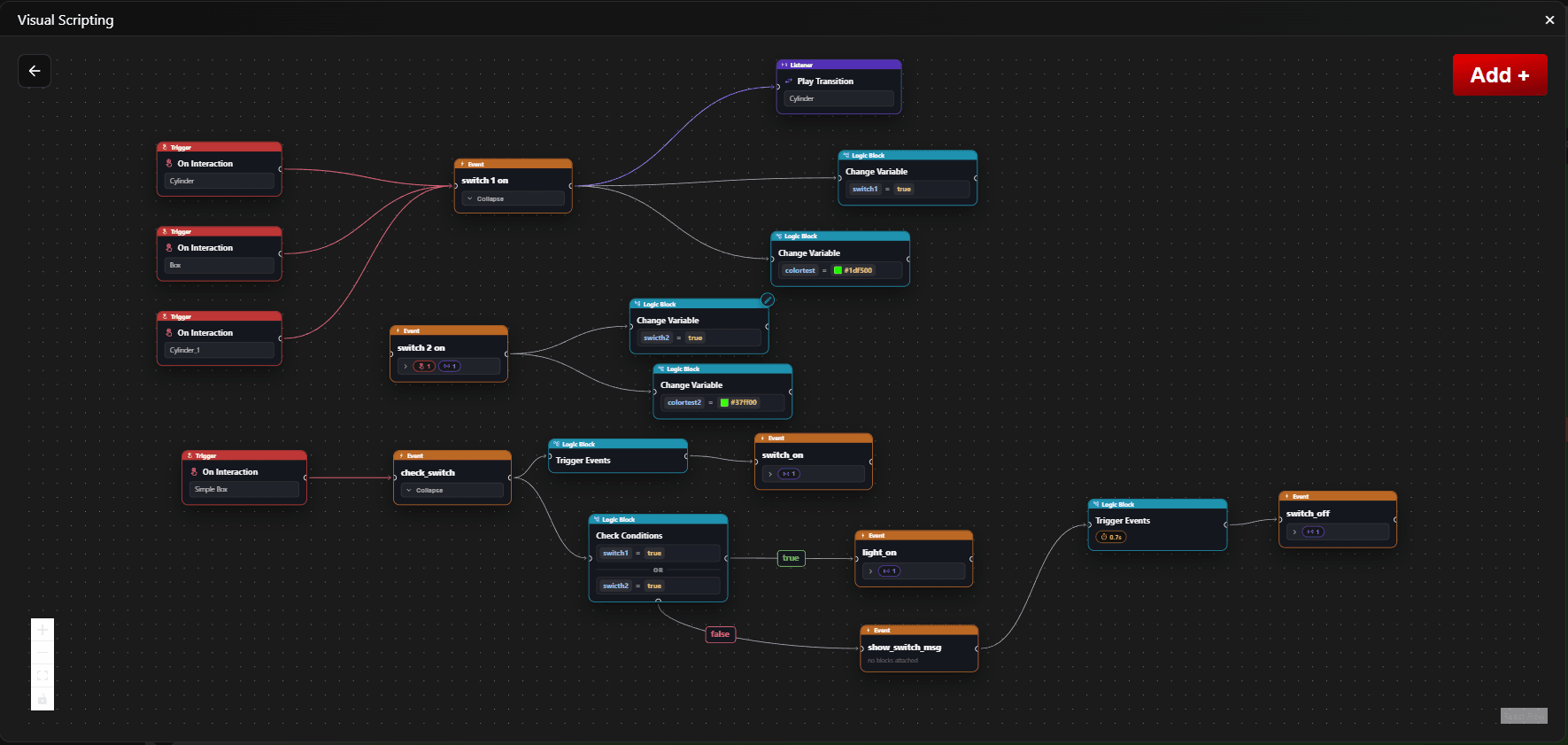
Visual Scripting shows project-level events and logic flows as a connected node graph. Use it to understand how events travel through actions and branches, or to create and connect logic without writing JavaScript.
Open the Visual Script
- Open Logic Flow from the editor.
- Click Visualize in the Logic Flow panel.
- The Visual Scripting window opens with event nodes, logic nodes, and their connections.
Read the Graph
- Event nodes are signals that start a flow or receive the result of an action.
- Logic Flow nodes describe an action such as Trigger Events, Change Variable, Check Conditions, or Switch Case.
- Connections show the execution path from an event to a logic flow and then to the next event.
- TRUE and FALSE branches show which event a Check Conditions node triggers for each result.
- Case branches show the event connected to each value in a Switch Case node.
Add Events and Logic
- Click Add + in the top-right corner of the graph.
- Select Event to add an existing event as a graph node.
- Select Logic Flow to create a new action and choose its start event and settings.
- Drag from one node handle to another to connect the flow.
- Connecting one event directly to another automatically creates or updates a Trigger Events logic flow.
Navigate and Edit
- Drag nodes to organise the graph. Their positions are saved for the next time you open it.
- Use the graph controls to zoom, pan, and fit the complete flow into view.
- Use a logic node's edit control to change that flow in the side panel.
- The graph shows project-level logic. Item-local logic flows are edited from the item that owns them and are not duplicated in this overview.
Example: Open a Door
player_interacts → Check Conditions → open_door
- Add the
player_interactsevent node. - Create a Check Conditions flow that tests whether the player has the required key.
- Connect the TRUE branch to
open_door. - Optionally connect the FALSE branch to an event that shows a locked message.
- Use
open_dooras the Start on event for the door's state transition.