


CtrlK
Script
Script (Advanced)
Add custom JavaScript code to extend item behavior beyond the built-in features. This is optional and intended for advanced creators.
Edit Script
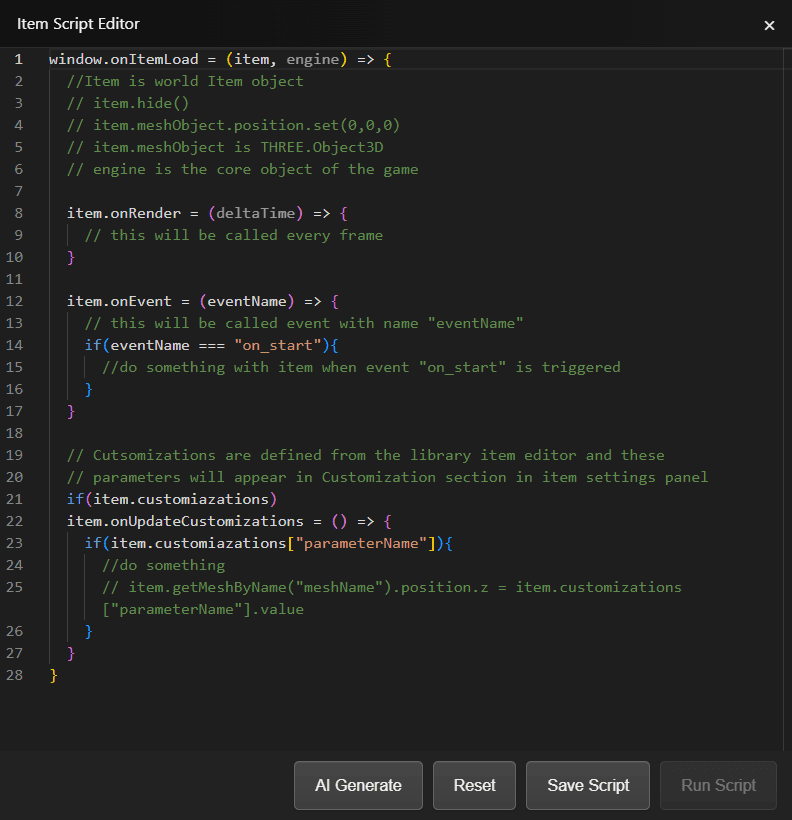
Edit Script opens the Item Script Editor. A new item starts with a commented template that shows the hooks you can fill in.
Script Hooks
Everything runs inside window.onItemLoad = (item, engine) => { ... }, which is called when the item loads. item is the project item and engine is the core object of the game.
item.onRender = (deltaTime) => { ... }- called every frame. Use it for movement and anything that has to update continuously.item.onEvent = (eventName) => { ... }- called when an event fires, so a script can react to the same events the no-code logic uses.item.onUpdateCustomizations = () => { ... }- called when a customization value changes. Customizations are defined in the library item editor and appear in the Customization section of the item settings panel.
The item gives you the scene object as well: item.meshObject is a THREE.Object3D, item.getMeshByName("meshName") reaches one mesh inside it, and helpers such as item.hide() are available.
Editor Actions
- AI Generate - open the AI panel and describe what the script should do.
- Reset - restore the starter template, discarding what is in the editor.
- Save Script - save the script to the item. It stays disabled while the editor is empty.
- Run Script - reserved for running a script from the editor. It is not available yet, so test scripts by playing the project.
When to Use Scripts
- Complex behaviors not possible with Logic Workflow
- Custom calculations or algorithms
- Advanced game mechanics
- Integration with external data
Best Practices
- Start with Logic Workflow - use scripting only when needed
- Keep scripts modular and well-organized
- Use events to communicate between scripts
- Test thoroughly on different devices
Relationship with Logic Workflow
- Logic Workflow is no-code
- Scripts can trigger events and read/write variables
- Scripts extend gameplay behavior beyond no-code limits
- Recommended: Start with Logic Workflow, add scripts only when needed